WAITING
It goes up and speaks
A chime, then the number read out loud, digit by digit. It is said once for the whole shop — not five times over from five different TVs.
Live shop-floor management for independent service centres
The board chimes, reads the number out loud, and the first qualified technician on the clock claims it from the floor tablet. Nobody walks the bays with a clipboard, and nobody shouts across the shop.
Runs in the browser on the TVs and tablets you already own. Nothing to install.
Try it
Press Claim on RO 4722 above, as Tech 02 — free, and next up. On the floor tablet that press is a number and a PIN. The row moves on the press, not on the round trip — and if the save never lands it puts the work back rather than telling the bay something that isn’t true.
01 — The moment
One row, three states, and every screen in the shop agreeing on which one it is in.
A chime, then the number read out loud, digit by digit. It is said once for the whole shop — not five times over from five different TVs.
The technician takes it from the floor tablet. The row is theirs the instant they press it, and the board carries who has the car and for how long.
The clock stops, and the day’s numbers already have it. Nobody stays behind to type it up.
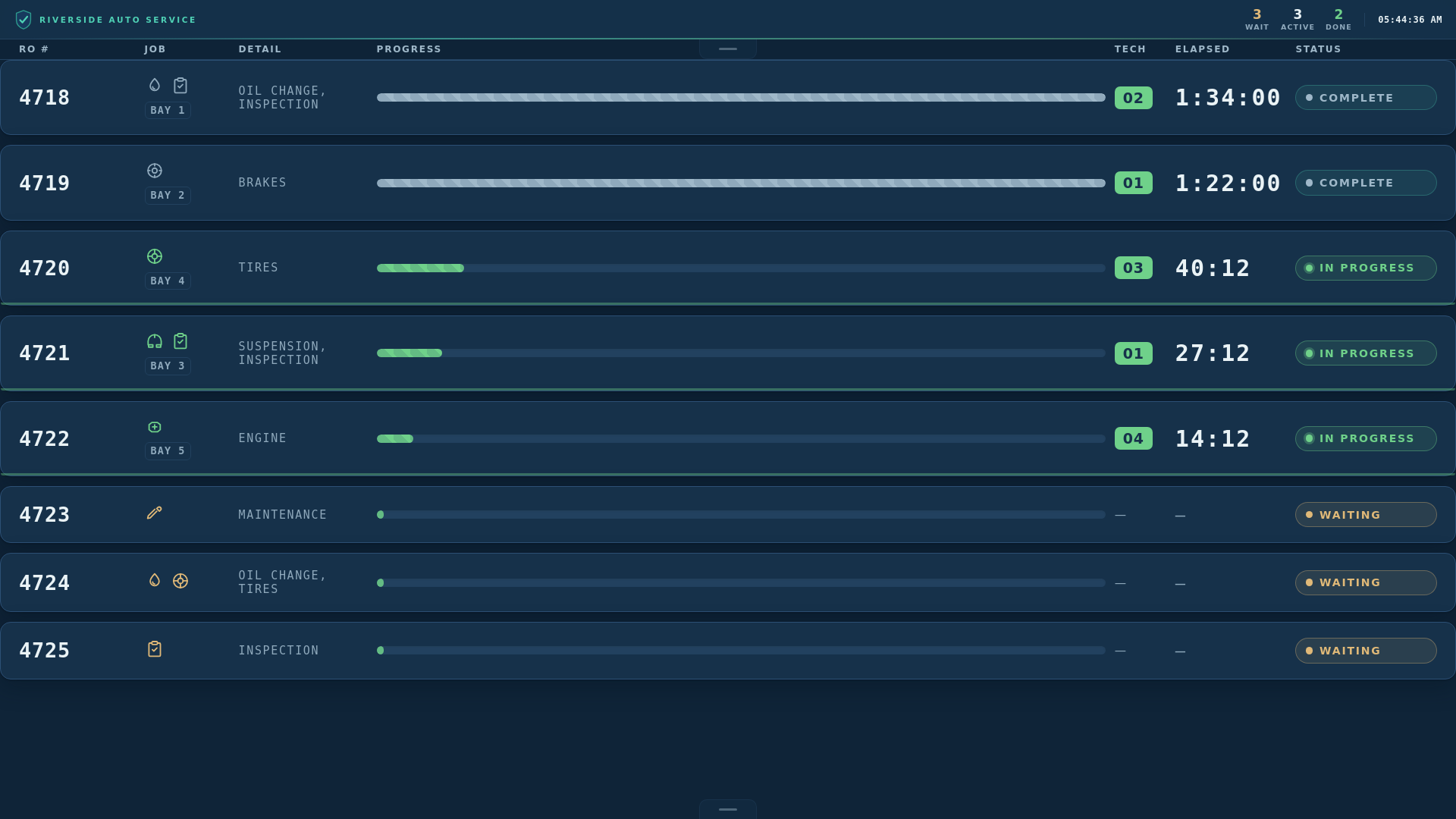
An actual screenshot — a real shop signed into the real app, not an illustration. Post at the counter and the wall has it in about a second, on every screen in the building.
02 — The screens
Put the board on the wall, a tablet at the desk, a tablet on the floor. Everything else follows from the same account.
The wall the whole shop reads: every open call, every car in a bay, and the clock running on each one.
Post a work order in a few taps — the number, the services from your own list, the bay.
Claim, pause for parts, hand off mid-repair, complete. Big buttons, sized for a glove.
Checked in, in the bay, ready at the counter. No names, no plates and no phone numbers.
The day so far, on your phone, wherever you happen to be standing.
Technicians, services, hours, report recipients and the archive.
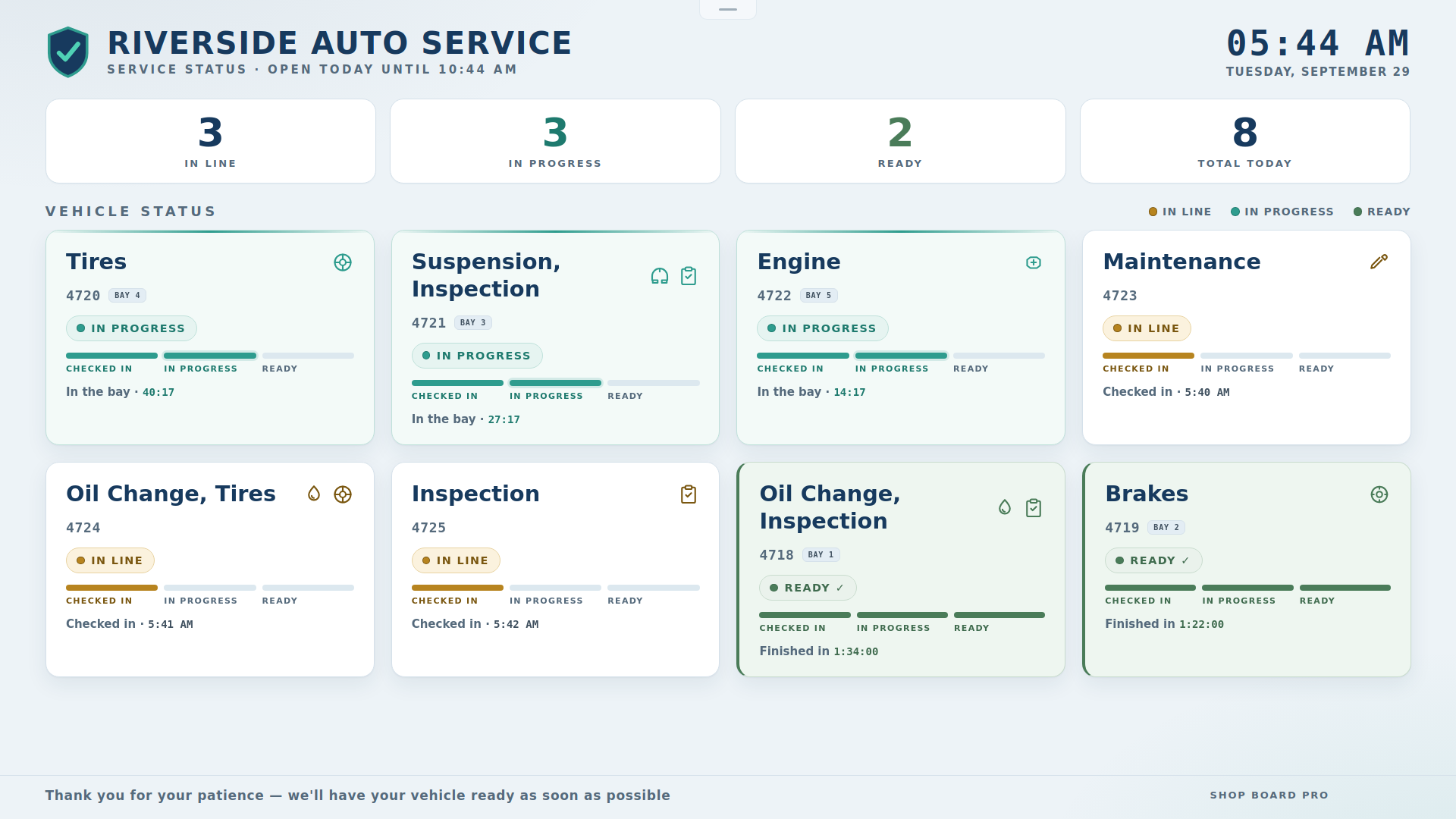
The waiting room screen — the same shop, the same minute, with none of the shop floor’s language on it. How it is set up.
03 — Setting it up
No server, no software, no visit from anybody. Every screen in the shop is a browser signed into the same account — including a screen you already own.
There is nothing to import. No historical data to migrate, no spreadsheet to map, no implementation call. The first work order can go up the same afternoon — and it is a real one.
04 — The kit
What goes on the wall is a TV and a tablet. Whatever drives them is about the size of a paperback and lives behind the bracket, out of sight.
If it is touched,
it is a touchscreen.
If it is only read, it
is a TV.
A wall screen runs full screen: no address bar, no tabs. Set a screen password in the settings and the controls go away as well; a touch at the top of the screen brings them down for whoever has the password, and they go back up on their own.
A cable where one can run, a wireless HDMI kit where one cannot. A second screen carrying the same picture is a splitter, not a second computer.
| Screen | What it is | Touched? |
|---|---|---|
| Board | a TV, with a mini PC or small media player behind it | read only |
| Lobby | a TV — often off the same player | read only |
| Front Desk | a tablet on a wall mount, or a touch monitor on the counter | touched |
| Shop Floor | a tablet on a wall mount, on the charger | touched |
| Owner’s Remote | the phone already in your pocket | touched |
| Store Admin | any browser — the office computer is fine | either |
We sell no hardware and take nothing from what you buy. These are the kinds of equipment shops use, not requirements and not a recommendation of any particular product — your own supplier will know what suits your building.
And none of it is specific to one trade. The board does not know what the work is — it knows a job, who has it, and how long it has been running. The services on the tiles are the ones you type in, so the same wall runs a tire shop, a quick lube, a body shop, a small-engine bench, an equipment yard or a service counter that has nothing to do with vehicles at all.
05 — Dispatch
Two modes, switched from Store Admin at any time.
Every qualified technician on the clock can take the call. The fastest hands win, and the board records who took what, when they took it, and how long it ran.
The turn goes to a technician who is free and qualified, in order. The order comes from who actually clocked in today, so it cannot be quietly edited in somebody’s favour.
06 — End of day
Work orders in and out, what was done, who finished what and how long each took — written up at your end-of-day time, and the end-of-day report is emailed to whoever should have it.
The send is the server’s, so it does not depend on a screen being left on.
Every day you close is archived and stays readable for two months: completion times, return-visit rate, and which services come through most.
Work done while the signal is gone is held on the tablet and lands as soon as you are back.
Every report carries a code that anyone can check. See how reports work
07 — Before it reaches your wall
Every change runs the whole battery before it goes anywhere, and the release is then driven on the live site by a real browser — signing in, posting a work order, claiming it and completing it — against the same database your shop would use.
A failing check is not re-run until it passes. It is a failure, and it stops the release.
It is not a shop-management system, and it is not trying to be. It writes no invoice, orders no part and takes no payment. Whatever you use for that, keep it.
Start free, or read what to put on the wall first.